 Aufi
7 Best Free Speechify Alternatives in 2026 (No Costly Paywalls & Unlimited Web Reading)
If you have spent any time searching for text-to-speech tools on YouTube, TikTok, or the App Store, you have certainly seen Speechify. Backed by celebrity voices like Snoop Dogg and massive ad campaigns, Speechify did a phenomenal job introducing mainstream audiences to AI-powered reading.
However, after the honeymoon phase wears off, a wave of frustration frequently follows. Thousands of daily listeners are actively looking for a free Speechify alternative, and for very valid reasons:
- The $139/Year Hidden Paywall: Speechify does not offer a flexible monthly subscription for everyday readers. Once its short 3-day trial expires, users are slapped with an annual $139 charge, prompting widespread billing complaints online.
- Harsh AI Word Caps on Free Tiers: When your trial ends or your free words run out, Speechify drops you back into robotic, monotone system voices that sound like a 2005 GPS unit.
- Cumbersome for Web Articles & Serial Fiction: Speechify was built around scanning academic PDF textbooks. If you enjoy reading serialized webnovels, light novels, fanfiction (such as on AO3 or Royal Road), or multi-page blogs, Speechify requires constant copy-pasting, lacks ad stripping, and cannot auto-advance across continuous web chapters.
Whether you need a completely free tool, an ad-free web chapter streamer, or a powerful offline book reader, modern AI text-to-speech technology has evolved. Here are the 7 best free alternatives to Speechify available in 2026.
Speechify Alternatives at a Glance: 2026 Comparison Matrix
Before diving into individual reviews, here is how the top free and budget-friendly alternatives stack up against Speechify on key features:
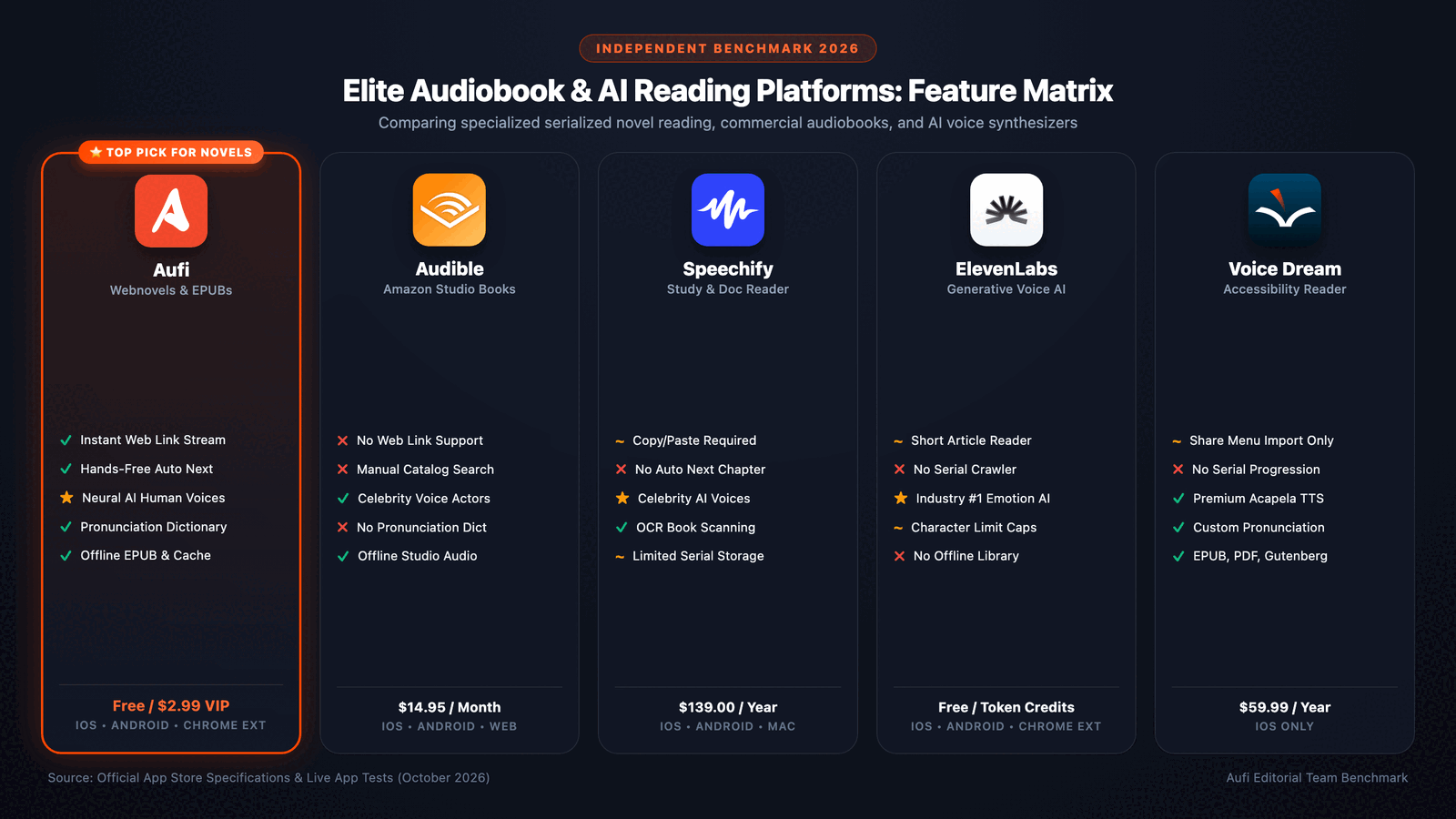
| Platform | Best Suited For | Voice Quality | Free Tier Generosity | Web Reading & Serials | Pricing |
|---|---|---|---|---|---|
| Aufi Top Pick | Webnovels, Articles & Books | Natural Neural AI | Generous Free Mode | ✅ Auto-Clean & Auto-Advance | Free / $4.99/mo or $29/yr |
| NaturalReader | Academic Scans & Work PDFs | High-Quality Neural | 20 mins/day AI voice | ⚠️ Browser extension only | Free / $9.99/mo ($59.88/yr) |
| Microsoft Edge Read Aloud | Desktop Web Browsing | Microsoft Azure Neural | 100% Free (Unlimited) | ⚠️ Desktop-first (Limited mobile) | 100% Free |
| ReadEra | Offline Android Ebooks (EPUB/PDF) | Device Engine Voices | 100% Free (No Ads) | ❌ Local files only | 100% Free / $11.99 Premium |
| @Voice Aloud Reader | Android Power-User Customization | Device / Cloud TTS | Free with banner ads | ⚠️ Android share sheet required | Free / $9.95 one-time |
| Voice Dream Reader | iOS Accessibility & Study | Acapela & Neural | Limited free preview | ⚠️ Manual URL extraction | $59.99/year (iOS only) |
| ElevenLabs Reader | Hyper-Realistic Short Narrations | Ultra-Expressive Generative AI | Token-capped free tier | ❌ No webnovel auto-pagination | Free tier / Token limits |
| Speechify | Celebrity Voice Novelty & Work Docs | Celebrity Neural AI | Severely throttled to robotic | ❌ Manual copy-paste required | $139.00/year |
The 7 Best Free Speechify Alternatives Reviewed
Aufi was created to address the exact flaws that make Speechify frustrating for everyday readers: intrusive paywalls, clunky web navigation, and zero automation for continuous reading. Unlike Speechify—which treats web pages like static scanned PDFs—Aufi acts as an intelligent audio browser and hands-free reader.
When you paste a link from any website (news, blogs, online articles, or serialized fiction portals like Royal Road, AO3, or Wuxiaworld), Aufi's content engine automatically strips pop-up banners, sidebars, and cookie prompts. It renders a clean reading canvas with synchronized word-by-word highlighting while fluent neural AI voices read smoothly in the background.
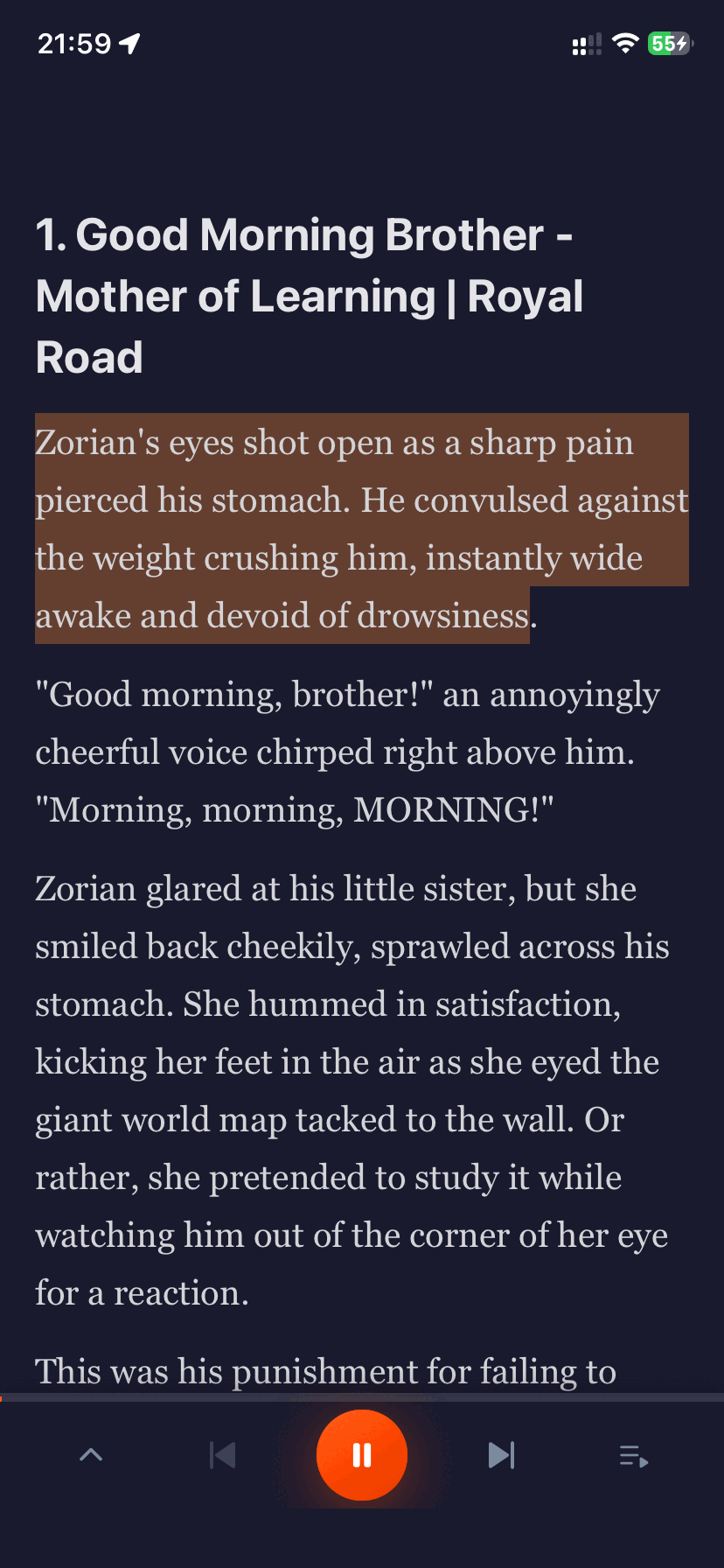
Crucially, Aufi solves the "Next Chapter Problem" that plagues Speechify: when you reach the end of an article or chapter, Aufi automatically loads the next page in sequence. You can lock your phone, put it in your pocket, and listen continuously during commutes, gym sessions, or while doing chores without ever having to touch your screen.
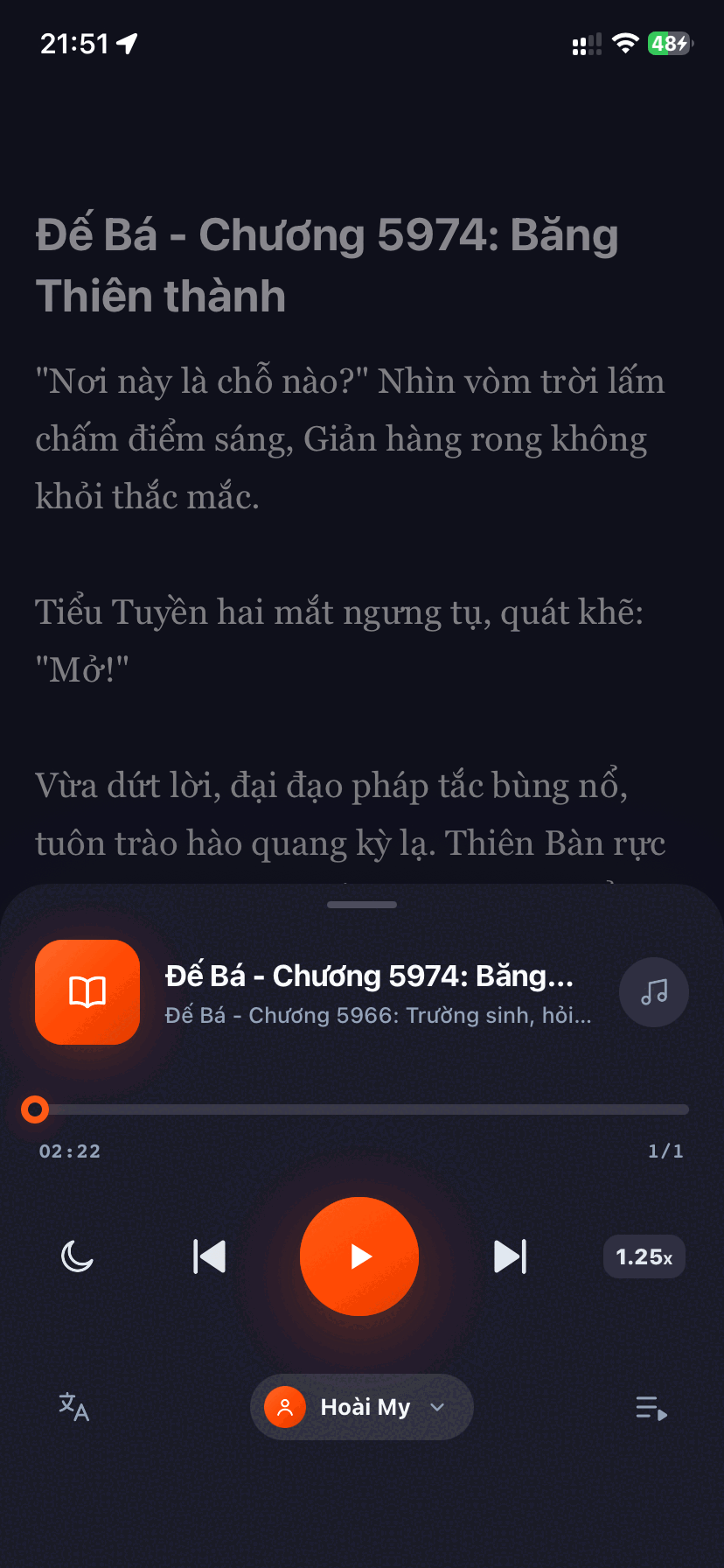
- Auto-Advance Chapters: Seamless continuous listening across hundreds of web pages hands-free.
- Smart Ad Stripper: Extracts pure text without requiring tedious manual copy-pasting.
- Fair, Transparent Pricing: Generous free usage, with optional Pro at just $4.99/mo or $29/yr (over 75% cheaper than Speechify).
- Offline EPUB & Web Library: Save web chapters and local EPUB books for offline travel.
- No celebrity licensed voices (focuses on realistic, soothing natural neural voices like Ava and Guy).
- Optimized for mobile apps (iOS & Android); desktop browser extension currently in development.
NaturalReader is Speechify's oldest and most direct competitor. Built primarily for college students, professors, and professionals with dyslexia, it excels at digesting dense academic papers, scanned textbooks, and PowerPoint presentations.
Its web reader and desktop Chrome extension allow users to upload PDF, Word, and Google Docs files with impressive accuracy. The voice quality is clear and articulate, and it supports specialized dyslexia-friendly fonts.
- Top-tier OCR for scanning paper textbook pages and dense PDFs.
- Chrome extension highlights text directly on desktop web browsers.
- Dyslexic font options and pronunciation editor.
- Free tier limits AI neural voices to just 20 minutes per day.
- Not optimized for continuous multi-chapter web fiction binging.
- Full premium subscriptions still cost $9.99/mo or $59.88/yr.
Many users don't realize that one of the absolute best text-to-speech engines in the world is already built right into Windows and Mac computers for free. Microsoft Edge includes a native Read Aloud feature powered by Microsoft Azure Neural Speech—the same enterprise-grade technology used by Fortune 500 corporations.
Simply press Ctrl + Shift + U (or Cmd + Shift + U on macOS) on any web page or opened PDF, and Edge will begin reading aloud with astonishing realism, natural cadence, and zero artificial robotic pitch.
- 100% Free Forever: Zero word limits, no account required, no subscription pop-ups.
- World-class Azure neural voices (such as Natural English Jenny and Guy).
- Works natively on any web page, news article, or local PDF opened in Edge.
- Primarily a desktop experience; Edge's mobile app lacks dedicated background reader controls.
- Does not save reading progress across multiple devices or auto-navigate serialized story URLs.
If your primary goal is reading and listening to offline documents—such as downloaded EPUB ebooks, PDF guides, MOBI, or FB2 files—ReadEra is beloved throughout the Android community. It is famously free, contains zero third-party ads, and does not require an internet connection.
ReadEra utilizes your Android device's built-in text-to-speech engine (such as Google Speech Services), allowing you to listen to entire books without consuming mobile data or paying a monthly subscription.
- Zero advertisements, zero subscriptions, and complete offline privacy.
- Supports almost every book format: EPUB, PDF, DOCX, MOBI, TXT, FB2.
- Clean, lightweight, battery-efficient design.
- Android Only: No iOS app for iPhone or iPad users.
- Voice realism depends on your phone's local TTS engine (not cloud neural AI).
- Cannot scrape online web page links directly (requires pre-downloaded files).
Developed by Hyperionics, @Voice Aloud Reader has been a staple of mobile TTS for over a decade. While its interface looks like it was designed in 2013, its under-the-hood flexibility is unmatched for technical users.
Users can share any web article directly into @Voice using the Android Share Sheet, queue up reading playlists, and build custom RegEx pronunciation dictionaries to fix difficult names and foreign terms.
- Powerful pronunciation replacement tools (custom regex and dictionary rules).
- Supports reading playlists with article queuing.
- Inexpensive one-time license ($9.95) to remove ads permanently.
- Dated, intimidating user interface with a steep learning curve.
- Exclusive to Android (no official iOS release).
- Lacks automated chapter detection on modern dynamic web applications.
Voice Dream Reader is an Apple Design Award winner that has long served as the benchmark for vision-impaired and accessibility-focused readers. It integrates seamlessly with Bookshare, Dropbox, Google Drive, and Project Gutenberg.
It offers rich typographic customization, pacers, word highlighting, and licensed voices from Acapela and NeoSpeech. However, recent changes in ownership shifted the app toward a steep $59.99/year subscription model, sparking backlash among long-time fans.
- Exemplary accessibility controls, keyboard navigations, and VoiceOver support.
- Direct integration with academic and public cloud libraries.
- Highly granular speed, pitch, and pause customizations.
- Recent transition to a $59.99/year subscription has reduced its appeal as a budget alternative.
- Android version was abandoned and is no longer updated.
ElevenLabs is the undisputed industry leader in expressive, generative voice cloning. Their dedicated mobile app, ElevenReader, brings these breathtaking emotional voice models directly to your smartphone.
If you want text read with genuine theatrical emotion—complete with natural pauses, laughter, and whisper inflections—ElevenLabs is unrivaled. However, because generative models are computationally heavy, listening to extended multi-hour fiction quickly consumes daily token allocations.
- The most human-like, emotionally nuanced voice models available today.
- Clean, modern mobile app interface on iOS and Android.
- Access to an extensive community voice library.
- Strict daily character/token caps on the free tier make marathon reading impossible.
- No automatic web scraper or chapter auto-advance for web fiction.
- High data consumption compared to optimized streaming readers.
Which Speechify Alternative Is Right for You?
Because each reading app focuses on different strengths, here is the quickest way to select the best tool for your exact routine:
- If you read online webnovels, fanfiction, or blog articles on your phone: Choose Aufi. Its automated ad stripper and continuous next-chapter auto-play make it the most seamless hands-free mobile reader by far.
- If you read web pages and documents on your PC or Mac laptop: Use Microsoft Edge Read Aloud. It is 100% free, requires no installation or registration, and delivers enterprise Azure neural voices.
- If you study university textbooks or dense PDF research papers: Try NaturalReader for its robust OCR and academic document parsing.
- If you have a collection of EPUB books on an Android device: Download ReadEra for completely free, ad-free offline reading.
- If you want Hollywood celebrity voices and don't mind spending $139/year: Stick with Speechify.
Ready for Unlimited, Distraction-Free Web Listening?
Skip the $139 paywall. Paste any web link into Aufi, relax with fluent natural AI voices, and enjoy automated chapter-by-chapter listening on iPhone and Android.
Frequently Asked Questions About Free Speechify Alternatives
Is Speechify completely free to use?
No. Speechify provides a limited free trial, but its free tier severely throttles neural AI voice access. Once your initial quota runs out, you are forced onto harsh, metallic system voices unless you pay for a Speechify Premium subscription, which costs $139 per year billed upfront.
What is the best free alternative to Speechify for mobile?
For mobile users reading web fiction, articles, and digital books, Aufi is the top recommendation. It provides natural neural speech, strips web ads cleanly, and auto-advances through multi-chapter stories without paywalls. For offline EPUB and PDF reading on Android, ReadEra is an outstanding 100% free option.
Why do people look for alternatives to Speechify?
The primary complaints driving users to look for alternatives include the steep $139/year annual commitment, unexpected auto-renewal charges after free trials, aggressive word count caps on natural voices, and the lack of automation for serialized web reading.
Can Speechify read web fiction and light novels continuously?
No. Speechify is built around single-document OCR. It does not automatically strip web banner ads or advance through serialized story chapters on popular reading websites, requiring listeners to repeatedly stop and paste new links manually.